
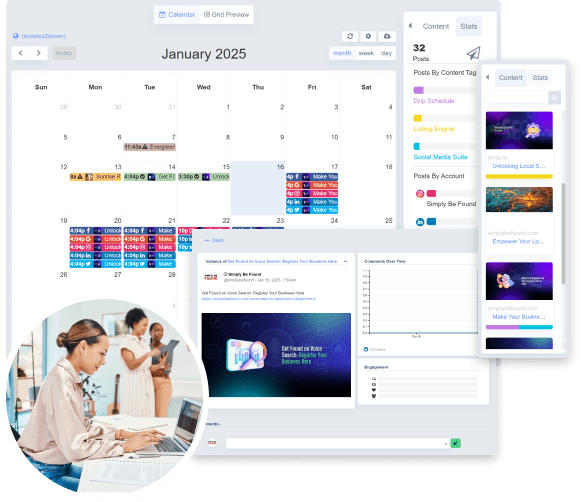
A well-planned social media calendar can be the key to boosting engagement, staying consistent, and saving time. Whether you’re a solo content creator or managing a brand, having a structured schedule helps ensure that your social media strategy aligns with your goals. Here’s how to create a social media calendar that actually works.
DEFINE YOUR GOALS
Before you start planning content, you need to know what you’re aiming for. Are you trying to grow your following, drive traffic to a website, generate leads, or increase brand awareness? Clear goals help you decide what kind of content to post and how often to post it.
KNOW YOUR AUDIENCE
Understanding your audience’s interests, habits, and the platforms they use is essential. Use insights from your social media analytics to identify what type of content resonates with them, the best times to post, and the frequency of engagement.
CHOOSE YOUR PLATFORMS
You don’t need to be everywhere. Focus on the platforms where your audience is most active. Whether it’s Instagram, LinkedIn, TikTok, or X (formerly Twitter), choose 2–3 platforms and tailor your content to fit each one.
DECIDE ON CONTENT TYPES
A good calendar includes a mix of content types:
Educational (tips, how-tos)
Promotional (product launches, sales)
Engaging (polls, questions)
User-Generated Content
Behind-the-Scenes
Plan out a content mix that supports your goals and keeps your feed fresh.
SET A POSTING FREQUENCY
Determine how often you’ll post on each platform. Be realistic — consistency is more important than quantity. For example, it’s better to post three times a week consistently than to post daily for a week and burn out.
CREATE A TEMPLATE
Use a spreadsheet, calendar app, or a social media scheduling tool like Trello, Notion, or Hootsuite. Include columns for:
Date and time
Platform
Content type
Caption
Visuals
Status (Drafted, Scheduled, Posted)
PLAN A MONTH AHEAD
Plan your content at least a month in advance to stay ahead and allow time for brainstorming and creating quality content. This also gives room to adjust for trending topics or sudden changes.
REPURPOSE CONTENT
Don’t reinvent the wheel. Turn a blog post into a carousel, a tweet into a Reel, or a customer review into a graphic. Repurposing saves time and maximizes the value of your content.
SCHEDULE AND AUTOMATE
Use scheduling tools to automate posts and free up your time. Tools like Buffer, Later, or Meta Business Suite let you plan posts in bulk and track performance across platforms.
TRACK PERFORMANCE AND ADJUST
Review your analytics regularly to see what’s working. Measure engagement, reach, clicks, and conversions. Use this data to fine-tune your calendar and content strategy over time.
FINAL THOUGHTS
A great social media calendar is one that’s organized but flexible. With a clear plan, consistent posting, and performance tracking, you’ll be able to grow your online presence with less stress and more impact.
